ACAI Account Cache Query
This documentation explains how to query the ACAI ACF Account Cache and provides guidelines and examples for constructing Query-JSONs to select specific AWS accounts from the cache.
AWS Account Context
Each AWS account context includes key details such as account ID, account name, account tags, and Organizational Unit (OU) information. Below is an example of the JSON structure for an AWS account context:
{
  "accountId": "905418151472",
  "accountName": "acai_aws-lab1_wl2",
  "accountStatus": "ACTIVE",
  "accountTags": {
    "owner": "Finance",
    "environment": "Non-Prod",
    "application": "SAP",
    "type": "Workload",
    "confidentiality_level": "Restricted"
  },
  "ouId": "ou-er26-hsal28aq",
  "ouIdWithPath": "o-3iuv4h36uk/r-er26/ou-er26-08tbwblz/ou-er26-sgxk358u/ou-er26-hsal28aq",
  "ouName": "NonProd",
  "ouNameWithPath": "Root/Lab_WorkloadAccounts/BusinessUnit_1/NonProd",
  "ouTags": {
    "module_provider": "ACAI GmbH",
    "environment": "Production",
    "module_source": "github.com/acai-consulting/terraform-aws-acf-org-ou-mgmt",
    "application": "AWS MA Core",
    "cicd_ado_organization": "acai-consulting",
    "cicd_branch_name": "initial_version",
    "cicd_pipeline_name": "Org-Mgmt",
    "module_name": "terraform-aws-acf-org-ou-mgmt",
    "module_version": "1.1.1",
    "cicd_ado_project_name": "aws-lab-2024"
  }
}
For a full inventory of the ACAI AWS Lab accounts, refer to the Full Inventory of ACAI AWS Lab.
Querying the Account Context Cache
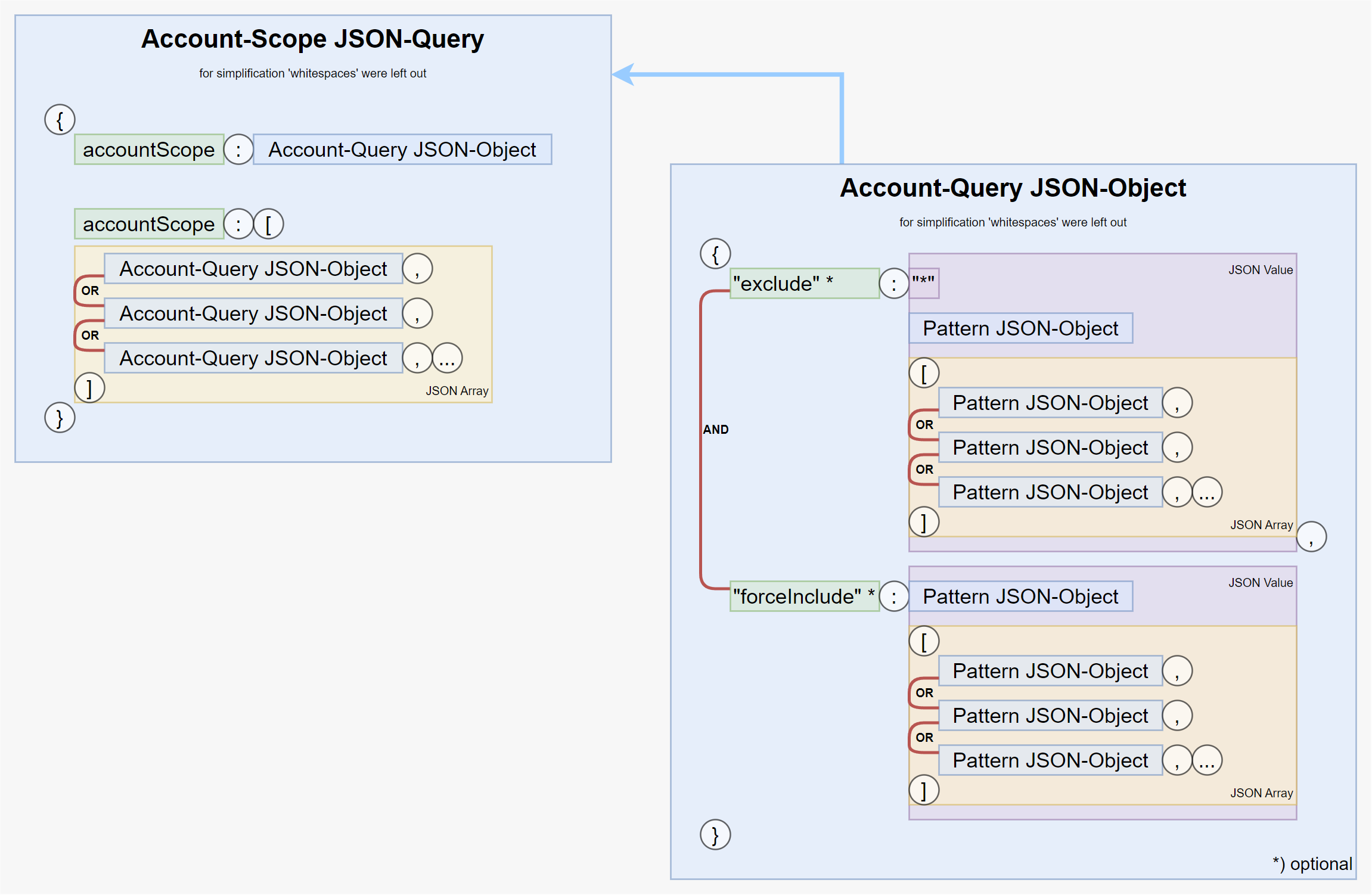
In large AWS Organizations, it is common to query groups of accounts that share similar criteria. The ACF Account Context Cache supports JSON-based queries. The JSON query format is as follows:
Query Syntax
The query JSON supports the following structure:
| Key | Value-Type | Comment |
|---|---|---|
| .exclude | "*" or JSON-Pattern or List of patterns (JSON-Pattern) |
(optional) |
| .forceInclude | JSON-Pattern or List of patterns (JSON-Pattern) |
(optional) |
Bare-String Equality for Attribute Values
In addition to the explicit logic-operator form ([{ "contains": "..." }], [{ "prefix": "..." }], …), an attribute value may also be given as a bare string. The engine then treats it as an exact-equality match:
is equivalent to
…matching only accounts whose ouNameWithPath is literally "/root/Platform/Core/". Child OU paths (e.g. "/root/Platform/Core/Security/") will not match. Use [{ "prefix": "/root/Platform/Core/" }] if you want children too.
The same shortcut works inside accountTags / ouTags (already shown in Example #1 and Example #4).
Cache Query Examples
Example #1: Exclude all accounts except those with a specific environment
This query selects all AWS accounts where accountTags.environment equals "Non-Prod":
{
  "query_json": {
    "exclude": "*",
    "forceInclude": {
      "accountTags": {
        "environment": "Non-Prod"
      }
    }
  }
}
Example #2: Select accounts with a specific string in the account name
This query selects all AWS accounts where accountName contains "-core-":
{
  "query_json": {
    "exclude": "*",
    "forceInclude": {
      "accountName": [
        {
          "contains": "-core-"
        }
      ]
    }
  }
}
Example #3: Select accounts with a specific environment and OU path
This query selects all AWS accounts where accountTags.environment equals "Non-Prod" and ouNameWithPath contains "BusinessUnit_1":
{
  "query_json": {
    "exclude": "*",
    "forceInclude": [
      {
        "accountTags": {
          "environment": "Non-Prod"
        },
        "ouNameWithPath": [
          {
            "contains": "BusinessUnit_1"
          }
        ]
      }
    ]
  }
}
Example #4: Select accounts matching one of multiple conditions
This query selects all AWS accounts where either accountTags.environment equals "nonprod" or ouNameWithPath contains "sandbox":
{
  "query_json": {
    "exclude": "*",
    "forceInclude": [
      {
        "accountTags": {
          "environment": "nonprod"
        }
      },
      {
        "ouNameWithPath": [
          {
            "contains": "sandbox"
          }
        ]
      }
    ]
  }
}
Example #5: Complex query with multiple conditions
This query selects all AWS accounts where either:
- ouNameWithPath contains "dept_2", or
- accountTags.environment equals "prod" and ouNameWithPath contains "dept_1".
{
  "query_json": [
    {
      "exclude": "*",
      "forceInclude": {
        "ouNameWithPath": [
          {
            "contains": "dept_2"
          }
        ]
      }
    },
    {
      "exclude": "*",
      "forceInclude": {
        "accountTags": {
          "environment": "prod"
        },
        "ouNameWithPath": [
          {
            "contains": "dept_1"
          }
        ]
      }
    }
  ]
}
Example #6: All non-core accounts (bare-string exclude)
This query selects every AWS account whose ouNameWithPath is not exactly "/root/Platform/Core/". It demonstrates the bare-string equality shortcut on the exclude side — no forceInclude needed, because by default all accounts are in scope.
Terraform equivalent (as used in lookup_account_clusters.tf):