SEMPER Configure Policy Documentation
Bases on policies SEMPER will provision AWS Config Rules, AWS Event Rules, manage Amazon GuardDuty suppression rules or tailor AWS Security Hub.
This is the documentation of the SEMPER Configure Policy-Types.
Required Semper Version: >=1.23.0
Configure-Section in the Policy-Repository
The SEMPER Configure Policies are stored in the "10_configure" folder of the Policy-Repository:
├───10_configure/
│   ├───config_rules/
│   │   │   configure_config_rule_policy1.json
│   │   │   configure_config_rule_policy2.json
│   │   │   ...
│   │   │
│   │   ├───disabled/
│   │   │   disabled_policy.json
│   │   │   ...
│   │
│   └───event_rules/
│   │   │   configure_event_rule_policy1.json
│   │   │   configure_event_rule_policy2.json
│   │   │   ...
│   │
│   └───guardduty_suppression_rules/
│   │   │   gd_suppression_rule_policy1.json
│   │   │   ...
│   │
│   └───securityhub/
│   │   ├───10_controls/
│   │   │   │   sh_control1.json
│   │   │   │   sh_control2.json
│   │   │   │   ...
│   │   │
│   │   ├───20_standards/
│   │   │   │   sh_standards.json
│   │   │
│   │   ├───30_standard_controls/
│   │   │   │   sh_standard_control1.json
│   │   │   │   sh_standard_control2.json
│   │   │   │   ...
Sample policies:
Folder: /10_configure/config_rules
Folder: /10_configure/event_rules
Folder: /10_configure/securityhub/10_controls
Folder: /10_configure/securityhub/20_standards
Folder: /10_configure/securityhub/30_standard_controls
SEMPER Configure Policy-Elements
The SEMPER Configure Policies always have the following sections:
| Key | Value-Type | Comment |
|---|---|---|
| configure | object | determines the SEMPER Configure Policy |
| .policyScope | object | (optional) as described in the following chapter Section policyScope. |
| .${typeSpecificSection} | object | will be described in the following chapter. |
SEMPER Configure Policy-Syntax
Distribute AWS Config Rules
Folder: /10_configure/config_rules typeSpecificSection: "configRuleSettings"
This policies allow you to specify the provisioning of custom AWS Config Rule to your member accounts.
SEMPER uses boto3 ConfigService.Client.put_config_rule for this feature.
{
  ...
  "configure": {
    "policyScope": <policyScopePattern>,
    "configRuleSettings": {
      "configRuleName" / "configRuleNameForce": 'string',
      "configRuleDescription": 'string',
      "complianceResourceTypes": ['string'],
      "sourceOwner": "CUSTOM_LAMBDA" | "AWS",
      "sourceIdentifier": 'string',
      "sourceDetails": [
        {
          "messageType": 'string',
          "maximumExecutionFrequency": 'string'
        }
      ],
      "inputParameters ": 'string'
    }
  }
  ...
}
| Key | Value-Type | Comment |
|---|---|---|
| .policyScope | object | (optional) as described in this chapter Section policyScope. |
| .configRuleSettings | object | specifying the attributes used for the boto3 call. |
| . .configRuleName | string | Will be prefixed with the semper_settings.member.configure.resource_prefix. According to boto3 ConfigRuleName-specification. |
| . .configRuleNameForce | string | alternative to: ..configRuleName. Will not be prefixed with the semper_settings.member.configure.resource_prefix. According to boto3 ConfigRuleName-specification. |
| . .configRuleDescription | string | (optional) according to boto3 Description-specification. |
| . .complianceResourceTypes | array of string | (optional) according to boto3 Scope.ComplianceResourceTypes-specification |
| . .sourceOwner | string | Either "CUSTOM_LAMBDA" for a custom Lambda function in the Core Security account or "AWS" for AWS managed Config rules. |
| . .sourceIdentifier | string | If "sourceOwner" is "CUSTOM_LAMBDA", name of the custom evaluation Lambda hosted in the Core Security that is valid for this Config Rule. If "sourceOwner" is "AWS", identifier of the AWS managed rule. List of AWS Config Managed Rules. E.g. IAM_PASSWORD_POLICY |
| . .sourceDetails | list(object) | NOTE: Required only if "sourceOwner" is "CUSTOM_LAMBDA". |
| . . .messageType | string | According to AWS Config Managed Rules API Reference |
| . . .maximumExecutionFrequency | string | (Only required if messageType is 'ScheduledNotification') According to AWS Config Managed Rules API Reference |
| . .inputParameters | string | (optional) A string, in JSON format, that is passed to the Config rule Lambda function. |
Distribute AWS EventBridge Rules
Folder: /10_configure/event_rules
typeSpecificSection: "eventRuleSettings"
This policies allow you to provision custom AWS EventBridge Rules to your member accounts.
SEMPER uses boto3 Events.Client.put_rule for this feature.
  ...
  "configure": {
    "policyScope": <policyScopePattern>,
    "eventRuleSettings": {
      "eventName" / "eventNameForce": 'string',
      "eventDescription": 'string',
      "eventPattern": 'string'
    }
  }
  ...
}
| Key | Value-Type | Comment |
|---|---|---|
| .policyScope | object | (optional) as described in this chapter Section policyScope. |
| .eventSettings | object | specifying the attributes used for the boto3 call. |
| . .eventName | string | Will be prefixed with the semper_settings.member.configure.resource_prefix. According to boto3 Name-specification. |
| . .eventNameForce | string | alternative to: ..eventName. Will not be prefixed with the semper_settings.member.configure.resource_prefix. According to boto3 Name-specification. |
| . .eventDescription | string | according to boto3 Description-specification. |
| . .eventPattern | array of string | The eventPattern has to follow this AWS specification: Amazon EventBridge event patterns |
Manage Amazon GuardDuty Suppression Rules
Folder: /10_configure/guardduty_suppression_rules
typeSpecificSection: "guardDutySuppressionRuleSettings"
Required Semper Version: >=1.24.0
This policies allow you to manage Amazon GuardDuty suppression rules. A suppression rule automatically archives new findings that match its criteria. Archived findings stay visible in Amazon GuardDuty, but they are not sent to Amazon EventBridge or AWS Security Hub - so they never reach the SEMPER processing stage.
Use a suppression rule for a known and accepted false positive of one Amazon GuardDuty finding type. All other finding types stay active, even if they involve the same IP address or principal.
SEMPER uses boto3 GuardDuty.Client.create_filter with the action ARCHIVE for this feature.
Different from the AWS Config Rules and AWS EventBridge Rules, the suppression rules are not provisioned to the member accounts:
- The Core Security account has to be the Amazon GuardDuty delegated administrator. SEMPER provisions the suppression rules only there - they apply to the findings of all member accounts.
- The suppression rules are provisioned to the regions specified in semper_settings.core_security.configure.guardduty_regions. If this list is empty, no suppression rule is provisioned. The regions can be overridden per policy with the
policyScope.regionScope. - Regions without an Amazon GuardDuty detector are skipped.
{
  ...
  "configure": {
    "policyScope": <policyScopePattern>,
    "guardDutySuppressionRuleSettings": {
      "suppressionRuleName" / "suppressionRuleNameForce": 'string',
      "suppressionRuleDescription": 'string',
      "rank": 123,
      "findingCriteria": {
        'string': {
          "Equals": ['string'],
          "NotEquals": ['string'],
          "GreaterThan": 123,
          "GreaterThanOrEqual": 123,
          "LessThan": 123,
          "LessThanOrEqual": 123
        },
        ...
      }
    }
  }
  ...
}
| Key | Value-Type | Comment |
|---|---|---|
| .policyScope | object | (optional) as described in this chapter Section policyScope. For the accountScope see Account Scope of a Suppression Rule. |
| .guardDutySuppressionRuleSettings | object | specifying the attributes used for the boto3 call. |
| . .suppressionRuleName | string | Will be prefixed with the semper_settings.member.configure.resource_prefix. According to boto3 Name-specification. Max. 64 characters including the prefix. |
| . .suppressionRuleNameForce | string | alternative to: ..suppressionRuleName. Will not be prefixed with the semper_settings.member.configure.resource_prefix. |
| . .suppressionRuleDescription | string | (optional) according to boto3 Description-specification. Max. 512 characters. |
| . .rank | number | (optional) according to boto3 Rank-specification. Position of the rule in the list of the Amazon GuardDuty filters. |
| . .findingCriteria | object | Map of a finding attribute to its condition, according to boto3 FindingCriteria.Criterion-specification. All attributes have to match (AND), the values of one attribute are alternatives (OR). Max. 50 values per Equals / NotEquals. For IP address attributes a value can also be a CIDR range. The attribute names are case-sensitive. |
Account Scope of a Suppression Rule
The policyScope.accountScope selects the member accounts whose findings are suppressed:
- SEMPER resolves the
accountScopeagainst all accounts of the AWS Organization and adds the matching account IDs asaccountIdcriterion to thefindingCriteria. All account attributes are supported - e.g. account ID, OU or account tags. - With every run of the Configure stage the
accountScopeis resolved again. When an account joins or leaves the scope, the suppression rule is updated. - Without
accountScopethe suppression rule applies to the findings of all member accounts. - If no account matches the
accountScope, no suppression rule is provisioned. - If the
accountScopematches all accounts of the AWS Organization, SEMPER omits theaccountIdcriterion. The suppression rule then applies to all member accounts - also to accounts that are created before the next run of the Configure stage. - Amazon GuardDuty accepts up to 50 values per criterion. If more than 50 accounts match, SEMPER provisions several suppression rules with up to 50 accounts each: the first one with the specified name, the following ones with the suffix
-2,-3, ... - Amazon GuardDuty allows up to 100 filters per account and region. One policy can therefore select up to 5,000 accounts, if no other filter exists in the region. Prefer an
accountScopethat matches few accounts or all accounts.
Do not combine accountScope and the accountId criterion
Specify the accounts either with the policyScope.accountScope or with an accountId criterion in the findingCriteria. A policy that contains both is rejected and logged as an error.
Lifecycle of a Suppression Rule
- When a policy is removed from the Policy-Repository or moved to a disabled folder, SEMPER deletes its suppression rules with the next run of the Configure stage.
- When a policy cannot be processed (e.g. invalid policy or failed AWS API call), SEMPER logs an error and keeps the suppression rules of this policy in their last provisioned state.
- A new or changed suppression rule only applies to new findings. Existing findings are not archived.
Example
The task scheduler of an application calls the AWS EC2 API with its instance role via the corporate network. Amazon GuardDuty reports this as UnauthorizedAccess:IAMUser/InstanceCredentialExfiltration.OutsideAWS. The following policy suppresses this finding type for the instance role and the corporate egress IP addresses in all accounts tagged with application = scheduler:
{
  "configure": {
    "policyScope": {
      "accountScope": {
        "exclude": "*",
        "forceInclude": {
          "accountTags": {
            "application": "scheduler"
          }
        }
      },
      "regionScope": {
        "exclude": "*",
        "forceInclude": "eu-central-1"
      }
    },
    "guardDutySuppressionRuleSettings": {
      "suppressionRuleName": "scheduler-credentials-outside-aws",
      "suppressionRuleDescription": "Task scheduler calls the EC2 API via the corporate network egress",
      "rank": 1,
      "findingCriteria": {
        "type": {
          "Equals": [
            "UnauthorizedAccess:IAMUser/InstanceCredentialExfiltration.OutsideAWS"
          ]
        },
        "resource.accessKeyDetails.userName": {
          "Equals": [
            "task-scheduler-instance-role"
          ]
        },
        "service.action.awsApiCallAction.remoteIpDetails.ipAddressV4": {
          "Equals": [
            "198.51.100.0/26",
            "203.0.113.10"
          ]
        }
      }
    }
  }
}
AWS Security Hub Configuration Policies
For AWS Security Hub please consider this diagram:
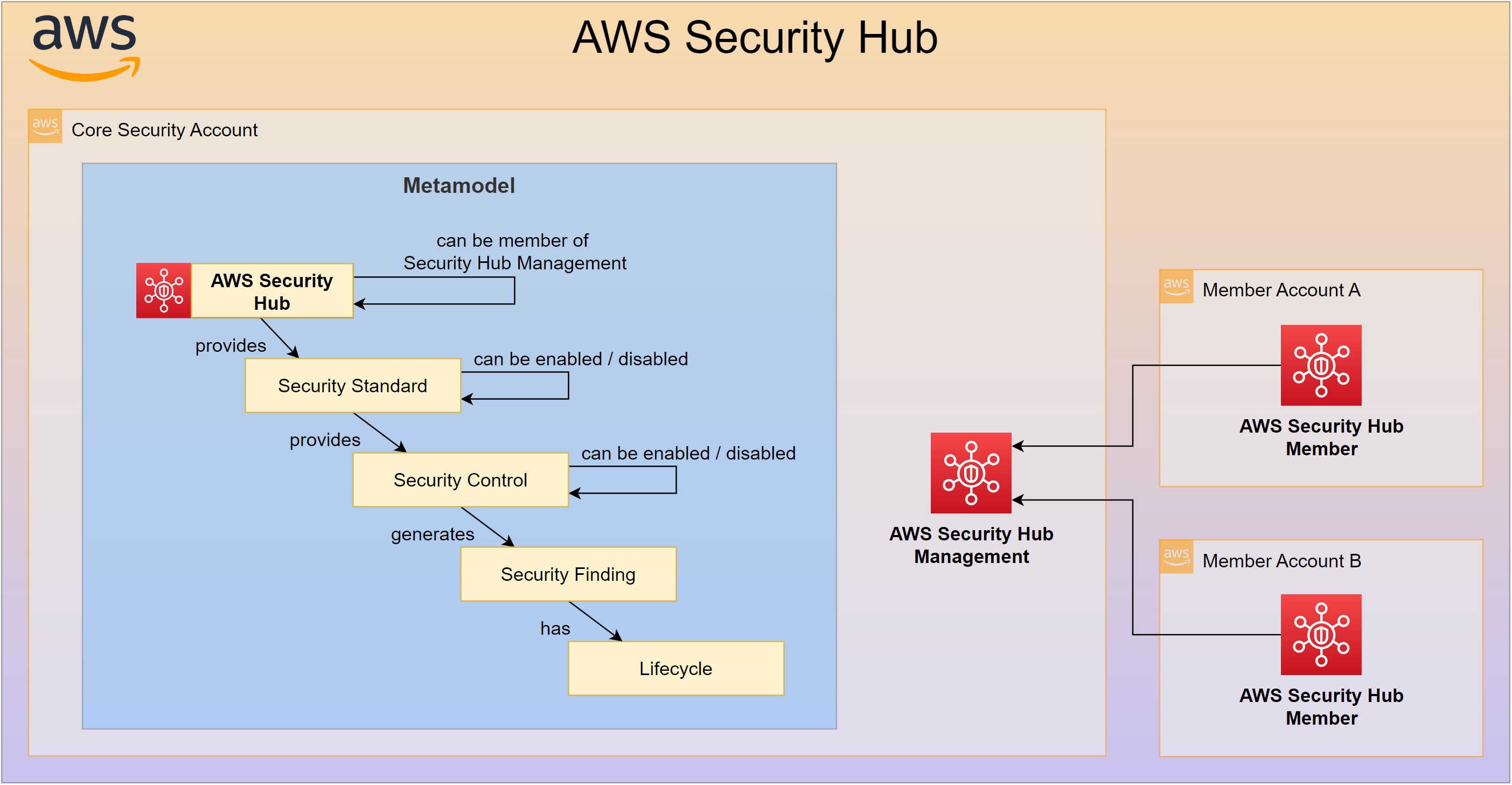
AWS Security Hub Control Policies
This policies allow you to customize parameters for AWS Security Hub Controls.
The inventory of the Security Hub Controls can be found here: AWS Security Hub Controls
Folder: /10_configure/securityhub/10_controls
typeSpecificSection: "shControlSettings"
{
  ...
  "configure": {
    "shControlSettings": [
      {
        "policyScope": <policyScopePattern>,
        "controlId": 'string',
        "parameters": <shControlParameters>,
        "updateReason": 'string'
      },
      ...
    ]
  }
  ...
}
| Key | Value-Type | Comment |
|---|---|---|
| .shControlSettings | list(object) | specify the Security Hub Control parameters |
| . .policyScope | object | (optional) as described in this chapter Section policyScope. |
| . .controlId | string | Security Hub Control ID |
| . .parameters | object | Security Hub Control Parameters |
| . .updateReason | string | Reason for the parameter adjustment. |
This JSON-Object shControlParameters will follow the Parameters described at this AWS page: boto3 SecurityHub.update_security_control
{
  'string': {
    'ValueType': 'DEFAULT'|'CUSTOM',
    'Value': {
      'Integer': 123,
      'IntegerList': [
        123,
      ],
      'Double': 123.0,
      'String': 'string',
      'StringList': [
        'string',
      ],
      'Boolean': True|False,
      'Enum': 'string',
      'EnumList': [
        'string',
      ]
    }
  },
  ...
}
AWS Security Hub Standards Policies
Policy: /10_configure/securityhub/20_standards/sh_standards.json
typeSpecificSection: "shStandardSettings"
Only one Security Hub Standards Policy allowed
There is only one (optional) policy allowed for Security Hub Standards configuration.
{
  ...
  "configure": {
    "shStandardSettings": [
      {
        "policyScope": <policyScopePattern>,
        "standardName": 'string',
        "standardIdentifier": 'string',
        "targetState": "ENABLED" | "DISABLED",
      },
      ...
    ]
  }
  ...
}
| Key | Value-Type | Comment |
|---|---|---|
| .shStandardSettings | list(object) | Specify the Security Hub Standards |
| . .policyScope | object | (optional) as described in this chapter Section policyScope. |
| . .standardName | string | Security Hub Standard Name |
| . .standardIdentifier | string | Security Hub Standard Identifier |
| . .targetState | string | Specifies, if the standard will be enabled or disabled. |
AWS Security Hub Standard Controls Policies
Folder: /10_configure/securityhub/30_standard_controls/
typeSpecificSection: "shStandardControlSettings"
{
  ...
  "configure": {
    "policyScope": <policyScopePattern>,
    "shStandardControlSettings": {
        "standardIdentifier": 'string',
        "disabledStandardControls": [
          {
            "standardId": 'string' | ['string', 'string', ...],
            "disableReason": 'string'
          }
        ]
      },
      ...
    ]
  }
  ...
}
| Key | Value-Type | Comment |
|---|---|---|
| .policyScope | object | (optional) as described in this chapter Section policyScope. |
| .shStandardControlSettings | list(object) | Specify the Security Hub Standards |
| . .standardIdentifier | string | Security Hub Standard Identifier |
| . .disabledStandardControls | list(object) | Specify the Security Hub Standard Controls to be disabled |
| . . .standardId | string or list(string) | Standards-Controls-ID. Wildcards are supported. |
| . . .disableReason | string | Reason for the standard control to be disabled. |
AWS Security Hub Standard Controls Use-Case Policies
Folder: /10_configure/securityhub/30_standard_controls/
typeSpecificSection: "shUseCaseSettings"
{
  ...
  "configure": {
    "policyScope": <policyScopePattern>,
    "shUseCaseSettings": {
        "disableReason": 'string',
        "disabledStandardControls": [
          {
            "standardIdentifier": 'string',
            "standardId": 'string' | ['string', 'string', ...]
          }
        ]
      },
      ...
    ]
  }
  ...
}
| Key | Value-Type | Comment |
|---|---|---|
| .policyScope | object | (optional) as described in this chapter Section policyScope. |
| .shUseCaseSettings | list(object) | Specify the Security Hub Standards |
| . .disableReason | string | Reason for the standard control to be disabled. |
| . .disabledStandardControls | list(object) | Specify the Security Hub Standard Controls to be disabled |
| . . .standardIdentifier | string | Security Hub Standard Identifier |
| . . .standardId | string or list(string) | Standards-Controls-ID. Wildcards are supported. |
Comparison of SEMPER to AWS Security Hub Configuration Policies
Since end of 2023 AWS Security Hub has introduced the concept of Configuration Policies [1] [2].
Central configuration in AWS Security Hub offers organizations a unified approach to managing security standards and controls across multiple accounts. By centralizing policy definitions, organizations can ensure consistency and quick deployment of security best practices across a sprawling and often complex multi-account environment. This central configuration framework addresses the increasing customer demand for tailoring security measures to meet the unique compliance and risk profiles of different business units or applications.
Many enterprises require the flexibility to define and implement distinct security controls that reflect the diversity of their operational needs. This demand is driven by the need to balance centralized governance with decentralized accountability. In practice, this means that while Security Hub provides a standardized method to enforce security standards, administrators must still tailor these controls to fit the specific security posture of each account.
However, there are some notable weak points in the current implementation of Security Hub’s central configuration feature. First, the platform is limited to only 20 configuration policies. This finite number may restrict organizations that need to define a broader or more granular set of policies. Second, assignment of these policies is constrained solely to organizational units (OUs) or individual account IDs, which can lead to inflexibility in larger environments where more dynamic or complex groupings are necessary. Finally, Security Hub does not offer regional differentiation, meaning that policies are applied uniformly across all regions. This lack of regional granularity can pose challenges for multinational organizations that must comply with local regulatory requirements or face varying threat landscapes.
ACAI SEMPER is a solution that addresses these limitations. It provides a more flexible and comprehensive approach to managing security standards and controls across AWS accounts.
Expanding Policy Capacity: While AWS Security Hub restricts you to only 20 configuration policies, ACAI SEMPER enables the creation and management of a broader range of custom policies. This flexibility allows organizations to define a more granular and extensive set of controls that better match their diverse security requirements.
Granular Policy Assignment: AWS Security Hub currently allows policy assignments only by organizational units (OUs) or individual account IDs. In contrast, ACAI SEMPER introduces dynamic and logic-based assignment capabilities. This means you can tailor controls to very specific segments of your infrastructure, ensuring that each account or group receives policies that are perfectly aligned with its risk profile.
Regional Differentiation: One significant limitation of Security Hub is the lack of regional differentiation, enforcing uniform policy application regardless of geographical nuances. ACAI SEMPER overcomes this by allowing for regional-specific configurations. This feature is especially beneficial for multinational organizations needing to adhere to diverse local regulations and address varying threat landscapes.