ACAI ACF Module: terraform-aws-acf-account-cache
GitHub Repository | Terraform Registry






Overview
The terraform-aws-acf-account-cache module deploys a serverless AWS account-context cache. This module enables querying and caching of account-context data from AWS Organizations, storing essential details such as account ID, name, status, tags, and organizational unit (OU) hierarchy.
Cached Account-Context Data
The module retrieves and caches the following details:
{
  "accountId": "654654551430",
  "accountName": "aws-testbed-core-backup",
  "accountStatus": "ACTIVE",
  "accountTags": {
    "owner": "Platform Security Backup Team"
  },
  "ouId": "ou-s2bx-wq9eltfy",
  "ouIdWithPath": "/o-5l2vzue7ku/r-s2bx/ou-s2bx-1rsmt2o1/ou-s2bx-wq9eltfy/",
  "ouName": "Security",
  "ouNameWithPath": "/root/Core/Security/",
  "ouTags": {
    "owner": "Platform Security"
  }
}
Key Features
- Deployable in any AWS account within the AWS Organization.
- Supports queries using a structured syntax: Account-Query.
- Optionally provisions the Organization-Info-Reader IAM Role for context cache assumption.
Architecture
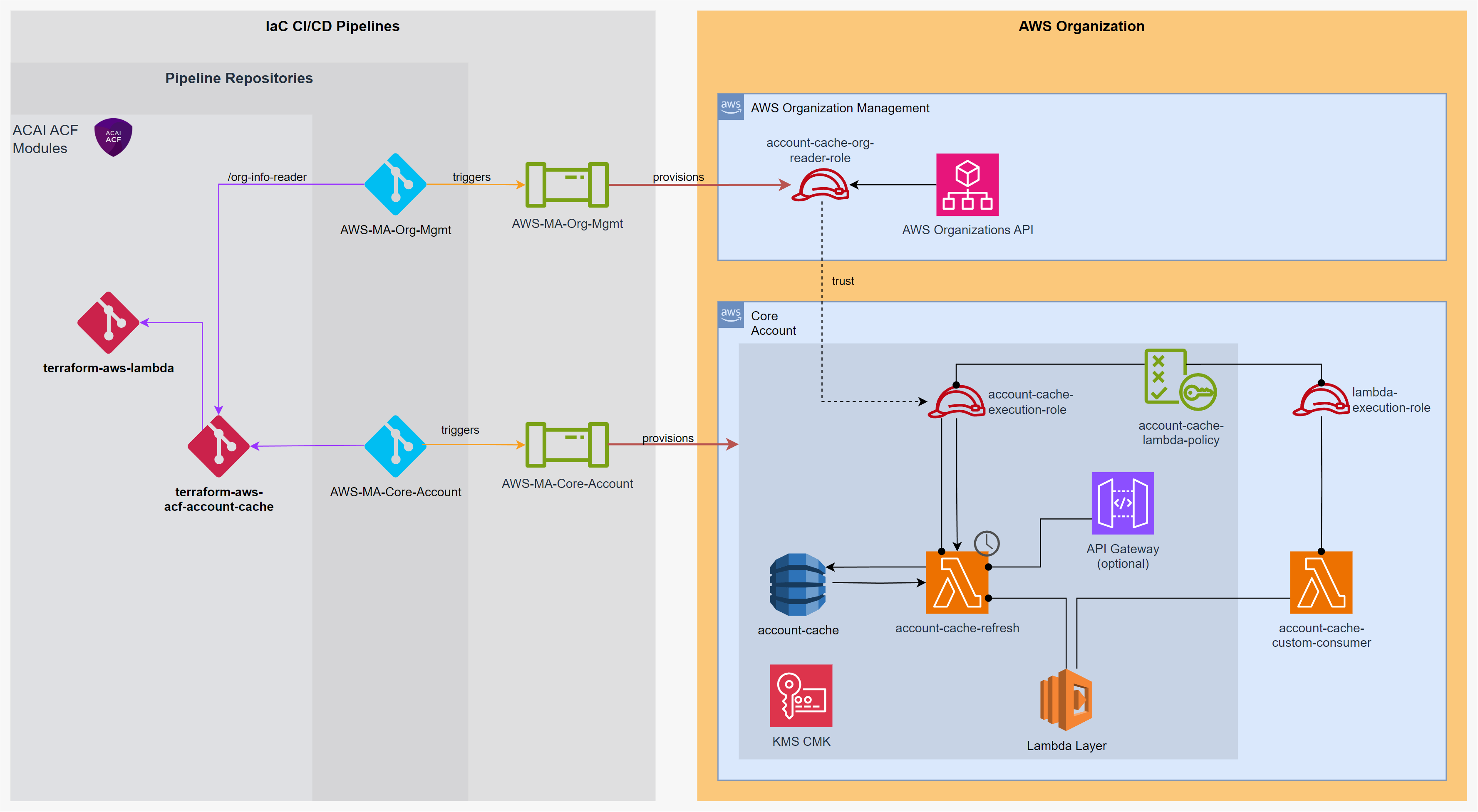
Dependencies
This module embeds core functionality from the following ACAI Terraform modules:
| Module Name | Version | Link | Local Folder |
|---|---|---|---|
| ACAI PowerTools | 1.0.9 | GitHub | ./modules-external/acai-powertools |
| ACAI Lambda | 1.6.1 | GitHub | ./modules-external/terraform-aws-lambda |
The Lambda layer is built by the powertools terraform-aws-lambda-layer
use-case (same pattern as terraform-aws-acf-observability). The build
script vendors selected acai_modules from
modules-external/acai-powertools/lib/acai/, installs
aws-lambda-powertools via pip (pip_requirements) and overlays
project-specific code from modules/lambda-layer/inline-files/. The
resulting layer is fully self-contained, so no separate AWS-managed
Powertools layer needs to be attached and the module works unchanged on
aws, aws-us-gov, aws-cn, aws-iso* and the European Sovereign
Cloud.
flowchart LR
    subgraph Upstream["🟦 Upstream sources"]
        PT_REPO["acai-solutions/<br/><b>acai-powertools</b><br/>(GitHub)"]
        LAMBDA_REPO["acai-solutions/<br/>terraform-aws-<b>lambda</b><br/>(GitHub)"]
        PIP[("PyPI:<br/><b>aws-lambda-powertools</b>")]
    end

    subgraph ACF["🟪 ACF / terraform-aws-acf-account-cache"]
        subgraph EXT["modules-external/ (vendored)"]
            AC_PT["<b>acai-powertools</b>/<br/>lib/acai/<br/>(logging, aws_helper, ai_llm)"]
            AC_PT_USECASE["acai-powertools/<br/>use-cases/<br/><b>terraform-aws-lambda-layer</b>"]
            AC_LAMBDA["terraform-aws-<b>lambda</b>/"]
        end
        AC_INLINE["modules/lambda-layer/<br/><b>inline-files</b>/acai/<br/>(cache, cache_query)"]
        AC_LAYER["modules/<b>lambda-layer</b>/<br/>(wraps powertools layer use-case)"]
    end

    PT_REPO -. vendored .-> AC_PT
    PT_REPO -. vendored .-> AC_PT_USECASE
    LAMBDA_REPO -. vendored .-> AC_LAMBDA

    AC_PT --> AC_LAYER
    AC_PT_USECASE --> AC_LAYER
    PIP --> AC_LAYER
    AC_INLINE --> AC_LAYER
Behavioural Notes
- Shared layer build. The single Lambda layer published by this module bundles
acai.aws_helper,acai.logging,acai.ai_llm(vendored from acai-powertools) plus the project-specificacai.cacheandacai.cache_querypackages. Both the cache-refresh Lambda and the LLM-backend Lambda consume the same layer. - LLM backend uses BedrockClaudeAdapter. The query-generator Lambda no longer calls
boto3.invoke_modeldirectly; it delegates toacai.ai_llm.adapters.outbound.bedrock_claude_adapter.BedrockClaudeAdapter, which handles retries, timeouts (auto-pinned below the Lambda timeout), and typedModelInvocationError/TextTooLongErrorpropagation.
Behavioural Notes
- Lazy cache loading.
ContextCache(...)no longer pre-loads every account on construction. Consumer Lambdas pay only for the accounts they actually look up viaget_member_account_context(account_id). The scheduled refresh Lambda still warms the full cache viarefresh_cache(). - TTL override via env var. Set
CONTEXT_CACHE_TTL_MINUTESon the consumer Lambda to skip thedynamodb:ListTagsOfResourcecall on cold start. The refresh Lambda gets this wired automatically fromvar.settings.cache_ttl_in_minutes. - Cross-account assume.
_create_org_clientusesacai.aws_helper.sts.StsClient(adaptive STS retries, CloudTrail-friendly session names) and supports an optionalExternalIdvia theorg_reader_role_external_idconstructor kwarg or theORG_READER_ROLE_EXTERNAL_IDenv var. Failure to assume the role now raises aRuntimeErrorinstead of silently degrading to the local Organizations client. - Self-healing cache rows. A DynamoDB row that is still TTL-valid but missing the
cacheObjectattribute (partial write, manual edit, schema drift) is logged at WARNING level and treated as a cache miss — the next call refreshes it from the Organizations API. - DDB deletion protection.
aws_dynamodb_table.context_cacheships withdeletion_protection_enabled = trueby default. Opt out for teardown viavar.settings.ddb_deletion_protection_enabled = false.
Deploying the Context Cache
module "org_info_reader" {
  source = "git::https://github.com/acai-solutions/terraform-aws-acf-account-cache.git//org-info-reader"

  settings = {
    trusted_account_ids = local.platform_settings.governance.org_mgmt.core_account_ids
  }
  providers = {
    aws = aws.org_mgmt
  }
}

module "account_cache" {
  source = "git::https://github.com/acai-solutions/terraform-aws-acf-account-cache.git"

  settings = {
    org_reader_role_arn = module.org_info_reader.iam_role_arn
  }
  providers = {
    aws = aws.core_security
  }
}

module "account_cache_llm_backend" {
  source = "git::https://github.com/acai-solutions/terraform-aws-acf-account-cache.git//modules/llm-backend"

  settings = {
    # Reuse the layer published by the cache module above to avoid
    # publishing a second copy.
  }
  lambda_layers = {
    acai_layer_arn = module.account_cache.cache_lambda_layer_arns.acai_layer_arn
  }
  providers = {
    aws = aws.core_security
  }
}
Cache Consumer
Terraform Query Example
data "aws_lambda_invocation" "query_for_prod_accounts" {
  function_name = local.platform_settings.governance.account_context_cache.lambda_name

  input    = <<JSON
{
  "query": {
    "exclude" : "*",
    "forceInclude" : {
      "ouNameWithPath" : [
        {
          "contains": "/Prod/"
        }
      ]
    }
  }
}
JSON
  provider = aws.core_security
}

locals {
  prod_accounts = jsondecode(data.aws_lambda_invocation.query_for_prod_accounts.result).result.account_ids
}
AWS Lambda Python Integration
To integrate with AWS Lambda, use the provisioned Context Cache Lambda Layer:
import os
from acai.cache.context_cache import ContextCache
from acai.cache_query.context_cache_query import ContextCacheQuery
import logging

LOGLEVEL = os.environ.get('LOG_LEVEL', 'INFO').upper()
logging.getLogger().setLevel(LOGLEVEL)
for noisy_log_source in ["boto3", "botocore", "nose", "s3transfer", "urllib3"]:
    logging.getLogger(noisy_log_source).setLevel(logging.WARN)
LOGGER = logging.getLogger()

ORG_READER_ROLE_ARN = os.environ['ORG_READER_ROLE_ARN']
CONTEXT_CACHE_TABLE_NAME = os.environ['CONTEXT_CACHE_TABLE_NAME']

def lambda_handler(event, context):
    # Optional: skip the dynamodb:ListTagsOfResource call on cold start by
    # setting CONTEXT_CACHE_TTL_MINUTES on the function's environment.
    context_cache = ContextCache(LOGGER, ORG_READER_ROLE_ARN, CONTEXT_CACHE_TABLE_NAME)
    context_cache_query = ContextCacheQuery(LOGGER, context_cache)

    accounts = context_cache_query.query_cache({
        "exclude": "*",
        "forceInclude": [
            {
                "accountTags": {
                    "environment": "Prod"
                },
                "ouNameWithPath": [
                    {
                        "contains": "/BusinessUnit_1/"
                    }
                ]
            }
        ]
    })

    context_cache.get_member_account_context(accounts[0])